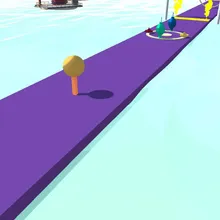

About Throw Color
Throw Color is a colour toss game about timing. Your ball sits on top of a bendy stick at the start of a long lane. Pull the ball back to bend the stick, let go, and it flies down the lane towards a spinning gate hung with red, yellow, green and blue balls.
The road crosses a different world every three levels: a tropic lagoon with palm islands, a fun fair pier, a farm river, a temple bay, a harbour city at dusk and a desert oasis, each with its own sky, sea and road. The coloured targets change shape with the world too, from buoys and floating rings to lanterns, fountains, haystacks and cacti, and every colour stop has an arch in its colour over the road. After the ten hand-made levels the roads get longer with more targets to pass, every fifth level has coins along the road and every tenth is a marathon worth double coins.
Wins earn coins for new launchers: after the coloured sticks come a slingshot, a spring launcher, a catapult, a golden trebuchet and a ball cannon, each bending and flinging the ball just like the stick. Ball Style gives your ball a new look, from a bowling ball and a disco ball to a planet and an eyeball, and it still takes every colour. Two more upgrades: Slow Spin makes the gates turn more slowly and Coin Bonus raises your reward. Throw Color runs on phones, tablets and computers with no download.
Throw Color at a glance
- Genre
- Casual
- Plays on
- Phone, tablet and computer, in any modern browser
- Screen
- Portrait (made for phones; fits any screen)
- Download
- 14 MB, no install
- Progress
- Saved in your browser; coins are shared by every TinyJar game
- Price
- Free (optional one-time Remove Ads)
- Updated
- 1 November 2026
How to play Throw Color
- Tap Start. The bar at the top shows how many colour stops this lane has.
- Press on the ball and drag back to bend the stick; the further you pull, the faster the throw.
- Let go when the gate ball of your colour is in front of you, so your ball hits it.
- Land on the stop strip to get your next colour, and clear every stop to win the level.
Controls
- Computer
- Click and hold the ball, drag back to aim the power, release to throw.
- Phone and tablet
- Touch the ball, slide back to bend the stick, lift your finger to throw.
Tips
- Watch one full turn of the gate before you throw, so you know when your colour comes round.
- The ball takes a moment to reach the gate: release just before your colour reaches the lane.
- Your ball's colour changes at every stop, so check it before each throw.
- Slow Spin is the best first upgrade: a slower gate gives you a wider window to throw.
Featured in
Frequently asked questions
Is Throw Color free?
Yes. Throw Color is free to play in your browser on TinyJar Games, with no download or sign-up.
Can I play Throw Color on my phone?
Yes. It works in the browser on Android phones, iPhones and tablets as well as on Windows, Mac and Chromebook computers.
Does my progress save?
Yes. Your level, coins, launchers and upgrades are saved in your browser on this device. Coins are shared by every game on TinyJar Games.
What can I buy with coins?
Launchers (three coloured sticks, then a Slingshot, Spring Launcher, Catapult, Golden Trebuchet and Ball Cannon), Ball Style (five ball looks) and two upgrades: Slow Spin and Coin Bonus. Open the shop with the cart button at the top of the game.
How many levels are there?
The levels do not end. Ten hand-made levels come first; after that every road is longer, with up to seven extra targets, coin roads every fifth level and a marathon every tenth. The world changes every three levels.
What happens if I hit the wrong colour?
You can retry the level, or once per level throw again from the last stop you reached.