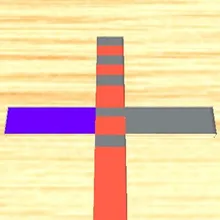

About Color Mix
Color Mix is a colour mixing game where you paint a grey shape to match the little picture on the notepad. Drag your finger or mouse over the shape and each part takes on its colour. Some parts need a single colour, and some need two colours blended together, so the order you paint in matters.
That is what makes it a puzzle rather than a colouring book. Paint a mixing strip with one colour, then with another, and it turns into the blend you need, for example red and blue making purple. Paint a part too early and it comes out the wrong colour. When that happens you can undo the mistake and carry on instead of starting over. Long strokes of the right colour build a combo, and every finished picture pays coins. After the ten hand-made pictures every level gives one of the shapes a brand-new colour plan, so the mixes keep changing, and a clean picture with no slips earns three stars.
Spend coins in the shop on eight canvas colours, from chalk white to midnight, and on upgrades: Steady Hand undoes wrong strokes for you, and Coin Bonus raises what each level pays. There is a tutorial followed by ten hand-made pictures, which then come back in shuffled order while the level count keeps climbing. Color Mix runs in your browser on phones, tablets and computers, with no download.
Color Mix at a glance
- Genre
- Puzzle
- Plays on
- Phone, tablet and computer, in any modern browser
- Screen
- Portrait (made for phones; fits any screen)
- Download
- 13 MB, no install
- Progress
- Saved in your browser; coins are shared by every TinyJar game
- Price
- Free (optional one-time Remove Ads)
- Updated
- 28 October 2026
How to play Color Mix
- Tap Tap to Start, then look at the notepad at the top: it shows the finished picture.
- Hold and drag over the grey shape to paint it. Each part takes its colour as you touch it.
- Paint the single-colour parts first, then the strips that mix two colours, so the blended parts come out right.
- Match the whole picture to finish the level and collect your coins.
Controls
- Computer
- Hold the left mouse button and move over the shape to paint it.
- Phone and tablet
- Touch the shape and slide your finger over it to paint.
Tips
- Study the notepad before you touch anything and work out which parts are blends of two colours.
- Drag slowly: a quick swipe can skip small parts or brush a part you did not mean to paint.
- Use the reset button in the top corner if you want a fresh start without losing the level.
- Steady Hand is worth buying early: it quietly undoes a wrong stroke each level.
Featured in
Frequently asked questions
Is Color Mix free to play?
Yes. Color Mix is free to play online in your browser on TinyJar Games, with no download or sign-up.
Can I play Color Mix on my phone?
Yes. It works in the browser on Android phones, iPhones and tablets, as well as on Windows, Mac and Chromebook computers.
What happens if I paint the wrong colour?
The level stops with a Wrong Colour screen. You can undo the mistake once per attempt (by watching a short ad or paying coins) and keep your progress, or retry the picture from the start.
Does my progress save?
Yes. Your level, skins and upgrades are saved in your browser on that device. Coins are shared by every game on TinyJar Games.
What can I buy with coins?
Canvas colours for the unpainted shape (Chalk, Sand, Charcoal, Denim, Mocha, Sage and Midnight) and two upgrades: Steady Hand, which undoes wrong strokes for free, and Coin Bonus, which adds up to 100% to level rewards.
How many levels does Color Mix have?
There is a tutorial and ten hand-made pictures. After that the levels never run out: each one takes a shape and gives it a new colour plan, with more colours to mix as you go, and the table changes every eight levels.